Scallops: The Complete Expert Guide to Selection, Cooking, Nutrition, and Flavor

Introduction to Scallops
Scallops are one of those ingredients that instantly elevate a meal. They look elegant on the plate, cook in minutes, and offer a delicate sweetness that feels both luxurious and comforting. Yet despite their reputation as a “restaurant-only” seafood, scallop are surprisingly simple to prepare at home when you understand the basics.
In this comprehensive guide, we will explore everything you need to know about scallops—from what they are and where they come from, to how to buy, store, cook, and serve them like a seasoned chef. Whether you are a seafood enthusiast or a curious home cook, this article will give you the confidence to work with scallops expertly and creatively.
What Are Scallops? Understanding the Basics
Scallops are a type of bivalve mollusk, meaning they have two hinged shells, similar to clams and oysters. They belong to the family Pectinidae and are found in oceans around the world. Unlike many other shellfish, scallop are known for their ability to swim by rapidly clapping their shells together, propelling themselves through the water in short bursts.
What we typically eat is the scallop’s adductor muscle—the round, firm muscle that opens and closes the shell. This muscle is prized for its tender texture and subtly sweet flavor. In some cuisines, especially in Europe and Asia, the coral (roe) is also consumed, but in many markets, particularly in North America, only the white muscle is sold.
There are two main types of scallop commonly available: sea scallops and bay scallop. Sea scallop are larger, often about the size of a large coin or even bigger, and are usually served individually as a centerpiece on the plate. Bay scallop are smaller, sweeter, and often used in pasta, seafood stews, or salads.
Understanding the difference between these types helps you choose the right scallop for your recipe. Sea scallops are ideal for searing and showcasing, while bay scallops work beautifully in dishes where you want multiple bites of delicate seafood flavor.
The Different Types of Scallops Around the World
Scallops are harvested globally, and regional varieties differ in size, flavor, and texture. In the United States, Atlantic sea scallop are commonly sourced from cold waters off the Northeast coast. These scallops are large, meaty, and perfect for high-heat cooking techniques like pan-searing.
On the West Coast, Pacific scallop are typically smaller but still flavorful. In Europe, especially in France and the United Kingdom, scallop are highly regarded in fine dining. The French often refer to them as “coquilles Saint-Jacques,” and they are frequently served with rich sauces or baked in their shells.
In Japan, scallops are a staple in sushi and sashimi. Japanese scallops are often larger and prized for their clean, sweet taste. They are sometimes served raw, lightly torched, or incorporated into delicate broths. The emphasis in Japanese cuisine is on freshness and purity of flavor.
While the species and harvesting methods may vary, high-quality scallop share common characteristics: a firm texture, mild sweetness, and a clean ocean aroma. When sourced responsibly and handled correctly, scallops from nearly any region can deliver an exceptional dining experience.
Fresh vs. Frozen: How to Choose the Best Scallops
One of the most common questions about scallops is whether fresh or frozen is better. The answer depends on availability and handling. Many scallop labeled as “fresh” at seafood counters have actually been previously frozen. This is not necessarily a problem, as freezing can preserve quality if done properly.
The more important distinction is between “dry” and “wet” scallop. Dry scallop are untreated and have not been soaked in a solution. Wet scallops, on the other hand, are treated with a phosphate solution that helps them retain moisture but can dilute flavor and prevent proper browning.
When shopping, look for dry scallop whenever possible. They should appear slightly beige or creamy in color, not bright white. Wet scallop often look unnaturally white and may release excessive liquid during cooking.
Frozen scallops can be excellent if they are individually quick frozen (IQF). When thawed gently in the refrigerator, they can perform nearly as well as fresh ones. The key is to avoid rapid thawing in warm water, which can compromise texture.
How to Store and Prepare Scallops Properly
Proper storage is crucial for maintaining scallop quality. Fresh scallops should be kept in the coldest part of your refrigerator and ideally used within one to two days of purchase. Store them in a shallow container, covered with a damp paper towel, and place the container over ice if possible.
Before cooking, gently pat scallop dry with paper towels. Moisture is the enemy of a good sear. Removing surface moisture allows the scallop to caramelize rather than steam. If you notice a small, tough side muscle attached to the scallop, simply peel it off and discard it.
Avoid rinsing scallop under running water unless absolutely necessary, as this can affect their texture and flavor. If you must rinse them, dry them thoroughly afterward.
For frozen scallops, thaw them overnight in the refrigerator. Once thawed, treat them as you would fresh scallops—dry them well and cook promptly.
Mastering the Art of Searing Scallops
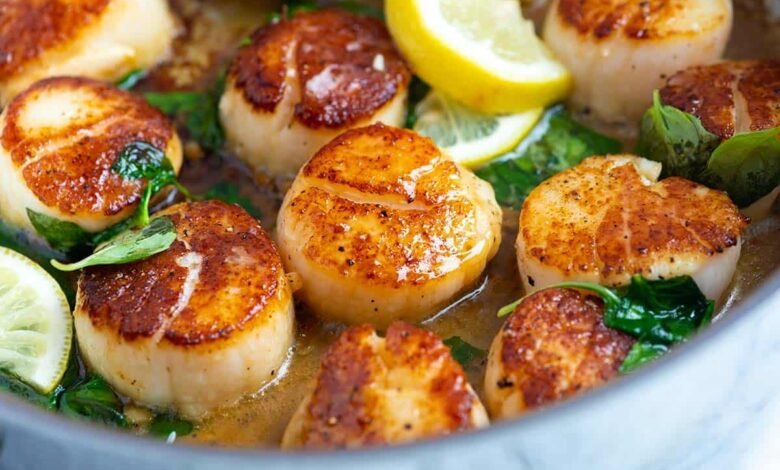
Pan-seared scallops are one of the most impressive yet simple seafood dishes you can make. The secret lies in high heat, minimal movement, and patience. Start by heating a heavy skillet—preferably stainless steel or cast iron—over medium-high heat.
Add a neutral oil with a high smoke point, such as grapeseed or avocado oil. When the oil shimmers, place the scallop in the pan, leaving space between each one. Do not overcrowd the pan, as this will lower the temperature and prevent proper browning.
Allow the scallops to cook undisturbed for about 1.5 to 2 minutes per side, depending on their size. You are looking for a golden-brown crust on the outside while keeping the interior tender and slightly translucent. Overcooking will result in a rubbery texture.
For added flavor, you can finish the scallop with a knob of butter, a squeeze of lemon, or fresh herbs like thyme. Spoon the melted butter over the scallops during the final seconds of cooking for an extra layer of richness.
Other Delicious Ways to Cook Scallops
While searing is the most popular method, scallops are incredibly versatile. They can be grilled, baked, broiled, poached, or even served raw if exceptionally fresh. Each technique highlights a different aspect of their flavor and texture.
Grilling scallop adds a subtle smokiness. To prevent sticking, lightly oil both the scallop and the grill grates. Skewering them can make handling easier. Grill over high heat for just a couple of minutes per side.
Baking scallops in a gratin dish with breadcrumbs, garlic, and butter creates a comforting, golden-topped dish. This method works particularly well with bay scallop and is perfect for entertaining.
In raw preparations like ceviche or sashimi, scallops must be impeccably fresh. Their natural sweetness shines when paired with citrus, chili, or soy-based dressings. These dishes celebrate the purity of the ingredient without heavy seasoning.
The Nutritional Benefits of Scallops
Scallops are not only delicious but also highly nutritious. They are an excellent source of lean protein, providing a substantial amount per serving while remaining low in fat. This makes them ideal for those seeking a high-protein, low-calorie option.
They are also rich in essential nutrients such as vitamin B12, magnesium, and selenium. Vitamin B12 supports nerve function and energy production, while selenium acts as an antioxidant, helping protect cells from damage.
Scallops contain omega-3 fatty acids, though in smaller amounts compared to fatty fish like salmon. These healthy fats contribute to heart health and may help reduce inflammation.
Because they are low in carbohydrates and calories, scallop fit well into various dietary patterns, including low-carb, keto, and Mediterranean-style diets. When prepared with minimal added fats, they remain a light yet satisfying choice.
Pairing Scallops with Flavors and Side Dishes
Scallops have a naturally sweet and delicate flavor, which means they pair best with ingredients that complement rather than overpower them. Citrus, butter, garlic, and fresh herbs are classic companions.
For a balanced plate, consider serving scallop with creamy risotto, mashed potatoes, or a light pasta. The creamy texture of these sides contrasts beautifully with the firm, seared exterior of the scallop.
Vegetables such as asparagus, spinach, peas, and cauliflower also work well. Their mild flavors and vibrant colors enhance the presentation and taste without overshadowing the seafood.
Wine pairings often include crisp white wines like Sauvignon Blanc or Chardonnay. These wines have enough acidity to cut through richness while enhancing the scallops’ natural sweetness.
Sustainability and Responsible Sourcing
Sustainability is an important consideration when purchasing seafood. Many scallop fisheries are well-managed, particularly in the United States, where regulations help maintain healthy populations.
Wild-caught scallops are the norm, as scallop farming is less common compared to other shellfish. Look for certifications or ask your fishmonger about sourcing practices. Responsibly harvested scallop not only protect ocean ecosystems but also ensure consistent quality.
Dredging, a common harvesting method, can impact ocean floors, though improvements in management have reduced some environmental concerns. Supporting fisheries that follow strict guidelines helps encourage responsible practices.
As consumers, making informed choices about seafood contributes to long-term ocean health. Choosing sustainably sourced scallops allows you to enjoy this delicacy with greater peace of mind.
Common Mistakes to Avoid When Cooking Scallops
Even experienced cooks can make simple mistakes with scallops. One of the most common errors is overcooking. Because scallop cook quickly, even an extra minute in the pan can turn them from tender to tough.
Another frequent mistake is failing to dry the scallop thoroughly. Excess moisture prevents caramelization and leads to steaming instead of searing. Always pat them dry before they hit the pan.
Using too low a heat is another issue. A hot pan is essential for achieving that coveted golden crust. If your pan is not hot enough, the scallop will release liquid and cook unevenly.
Finally, over-seasoning can mask their natural flavor. A light hand with salt and pepper is often all you need. Let the scallops shine as the star of the dish.
Conclusion:
Scallops combine elegance, flavor, and ease of preparation in a way few ingredients can match. They cook quickly, pair beautifully with a wide range of flavors, and offer impressive nutritional benefits.
With the right techniques—choosing dry scallop, drying them thoroughly, and cooking them at high heat—you can achieve restaurant-quality results at home. Their versatility means they can adapt to both casual weeknight meals and sophisticated dinner parties.
By understanding how to source, store, and cook scallop properly, you unlock a world of culinary possibilities. Once you master the basics, scallops become less intimidating and more inspiring.
Whether seared to golden perfection, gently poached, or served raw in delicate slices, scallops truly are one of the ocean’s most refined treasures.